Hardware
ESP32 adhan clock
A palm-sized clock that shows the next prayer and plays the adhan. It works out the times itself, so it needs no internet, account or app.
By Muntasir Joarder · Published 23 Nov 2026 · Updated 23 Nov 2026
At a glance
- What it does
- Shows the next prayer and plays the adhan, with no internet, account or app.
- Built for
- Muslim homes that want the adhan without a phone, an account or a subscription. Mine first.
- Stack
- ESP32-S3, ESP-IDF, Arduino, LVGL 9, C++
- Status
- Working prototype (firmware 0.1.8) on my desk
- Running cost
- Nothing. There's no server: updates are files on a GitHub release page.
- Code
- Not public yet
Why I built it
I wanted the adhan at home without reaching for my phone. What you can buy falls into two camps. There are cheap azan clocks with segment LCDs and tinny beeps, and there are cloud picture frames that want an account and a working internet connection to keep doing their job. I wanted something small and calm that gets the times right by itself and sounds decent.
I set one rule early: the clock must never miss an adhan. So nothing important is allowed to depend on the internet, an account or a phone.
What it does
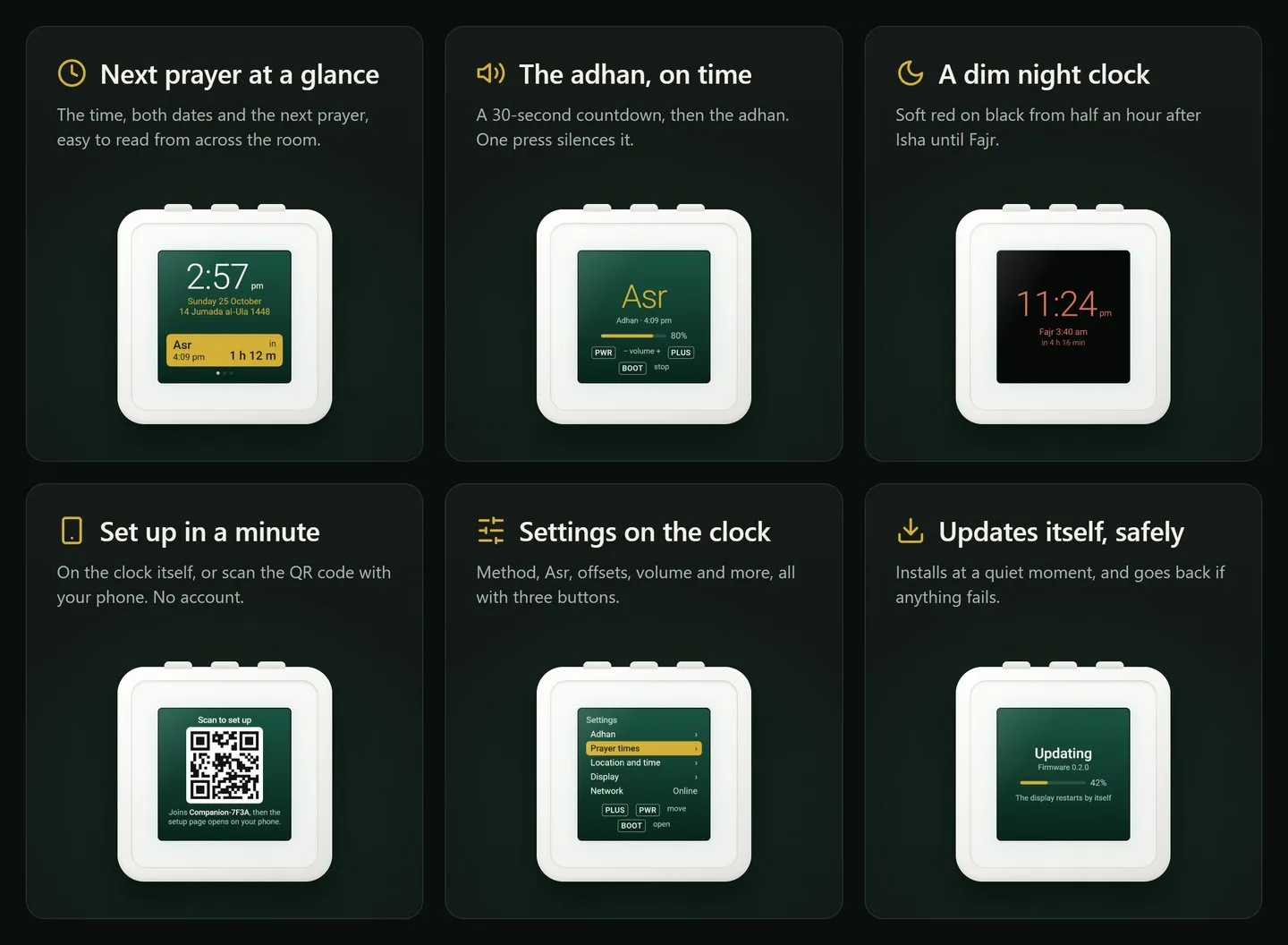
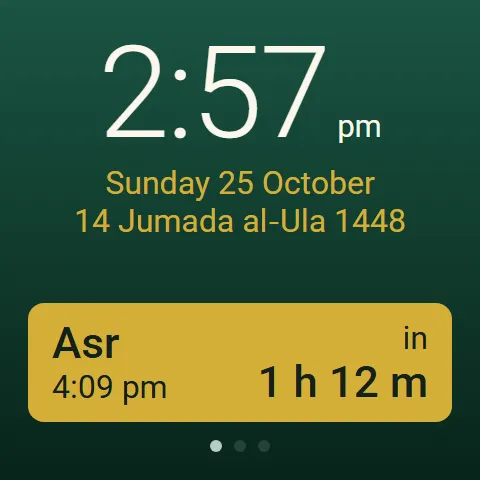
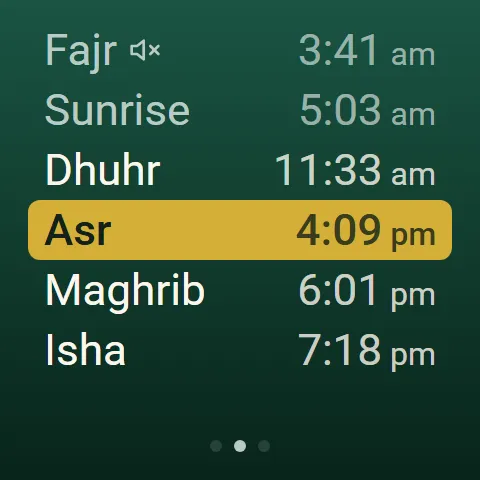
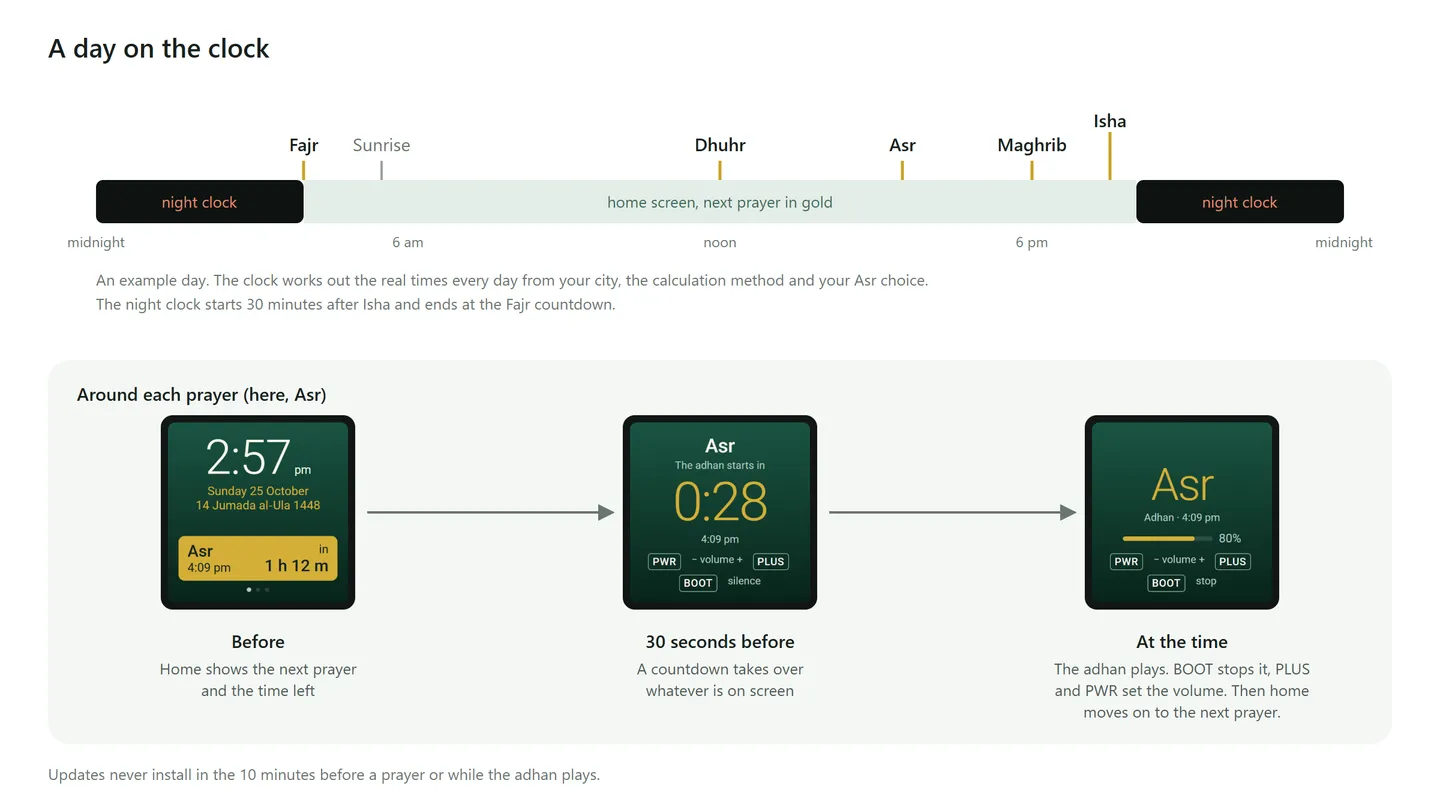
The home screen answers one question from across the room: when is the next prayer? It shows the time, the Gregorian and Hijri dates, and the next prayer in a gold bar with the time left. Press a button and you get the whole day’s times.
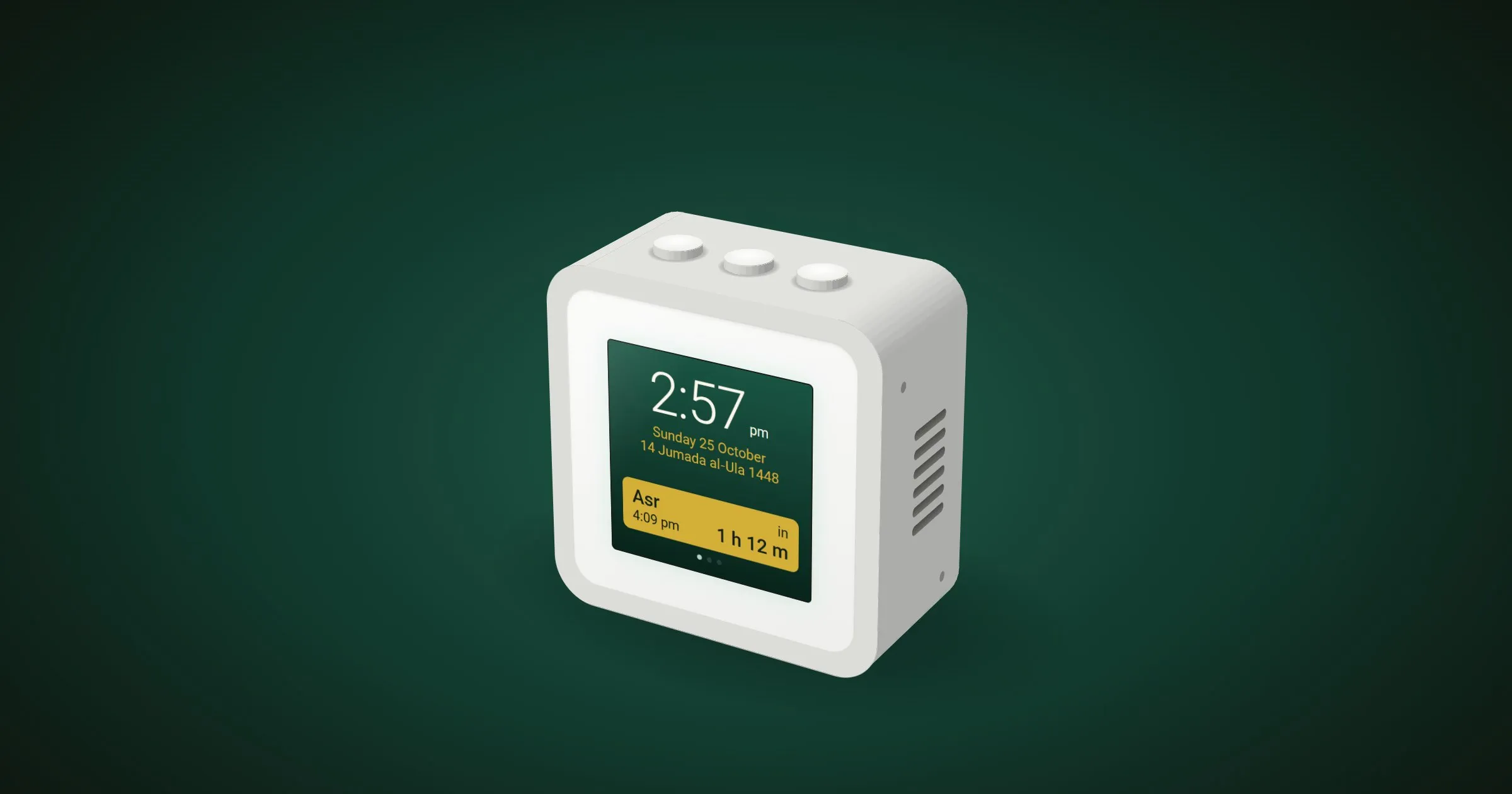
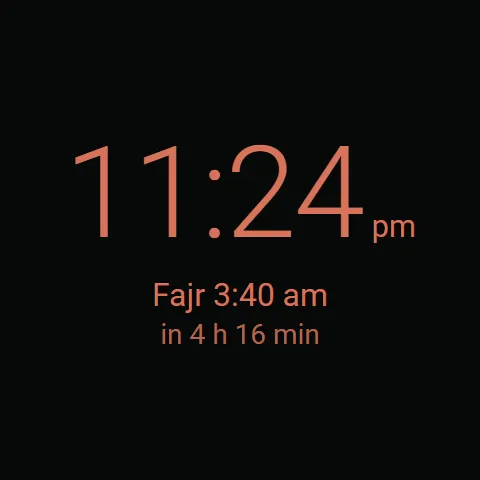
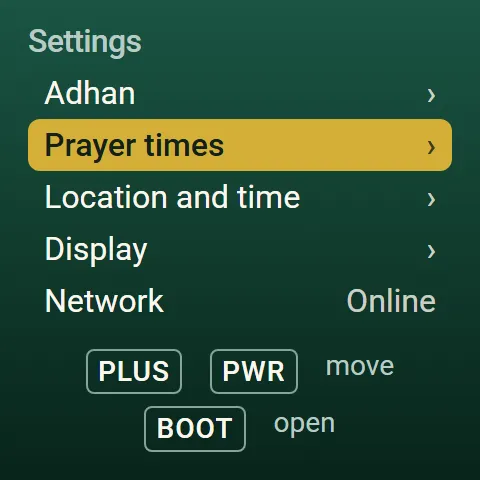
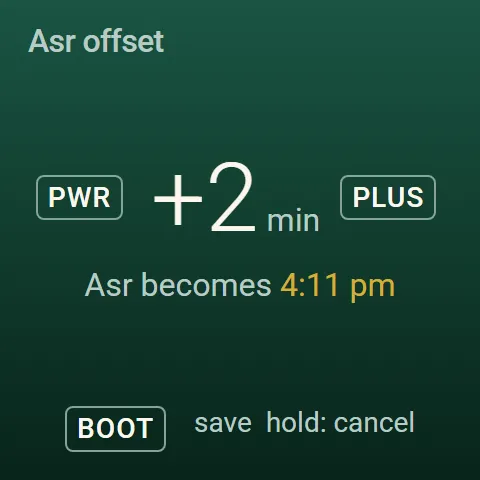
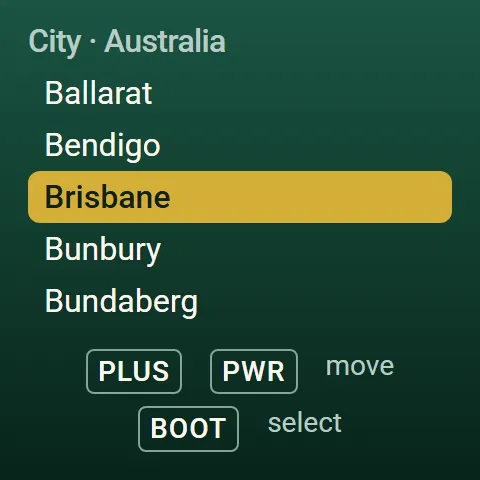
The clock at the top of this page is a render, and the screen images are my design files at the display’s real 240×240 size, which the firmware draws to match. Photos of the real clock will come with the demo video.
Thirty seconds before each prayer, a countdown takes over whatever is on the screen. Then the adhan plays from the clock’s own memory. BOOT silences it, and PLUS and PWR turn the volume up or down for that adhan only. Fajr gets its own recording.
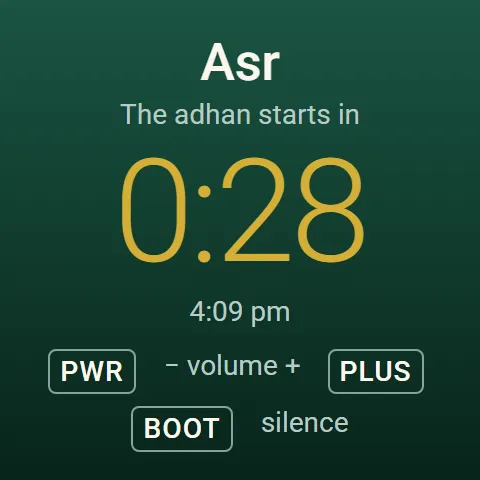
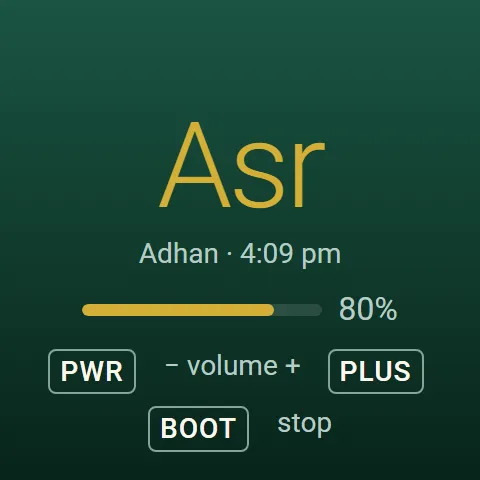
At night it gets out of the way. From half an hour after Isha until Fajr, the screen turns into a dim red clock on black, so it doesn’t light up the bedroom. Fajr can come before 4 am, and I wanted silencing it to take one press, half asleep.
Everything else lives in the settings, on the device: adhan on or off for each prayer, volume, the calculation method (seven are built in), the Asr school, a nudge of up to 30 minutes for each prayer to match your local mosque, a ±1 day correction for the Hijri date, your city, 12 or 24 hour time, brightness, night mode, Wi-Fi, offline mode and updates. There’s also voice control: say “Hi ESP” and then “next prayer”, “stop” or “volume up”. The speech recognition runs on the clock, so no audio leaves it. Voice is the newest part, and I’m still testing how well it hears from across a room.
What I used
| Part | Job |
|---|---|
| Waveshare ESP32-S3-LCD-1.54 | The whole clock: chip, screen, buttons, audio and case in one small board |
| ESP32-S3 (on the board) | Two cores at 240 MHz, 8 MB of PSRAM and 16 MB of flash, with Wi-Fi built in |
| ST7789 display, 1.54 inch | 240×240 pixels over SPI |
| ES8311 codec and an amplifier | Plays the adhan through the speaker |
| ES7210 and two microphones | Listen for voice commands |
| USB-C cable | Power. My version of the board has no battery |
The firmware is C and C++, built with Espressif’s ESP-IDF 5.5, with the Arduino core for ESP32 running as one of its components. LVGL 9 draws the screens with Roboto fonts. Espressif’s codec and audio libraries drive the speaker and decode the MP3 recordings, and their ESP-SR library handles the wake word and commands. The city list comes from GeoNames, and the prayer calculation is my own port, checked against the open-source adhan-js library.
How it works
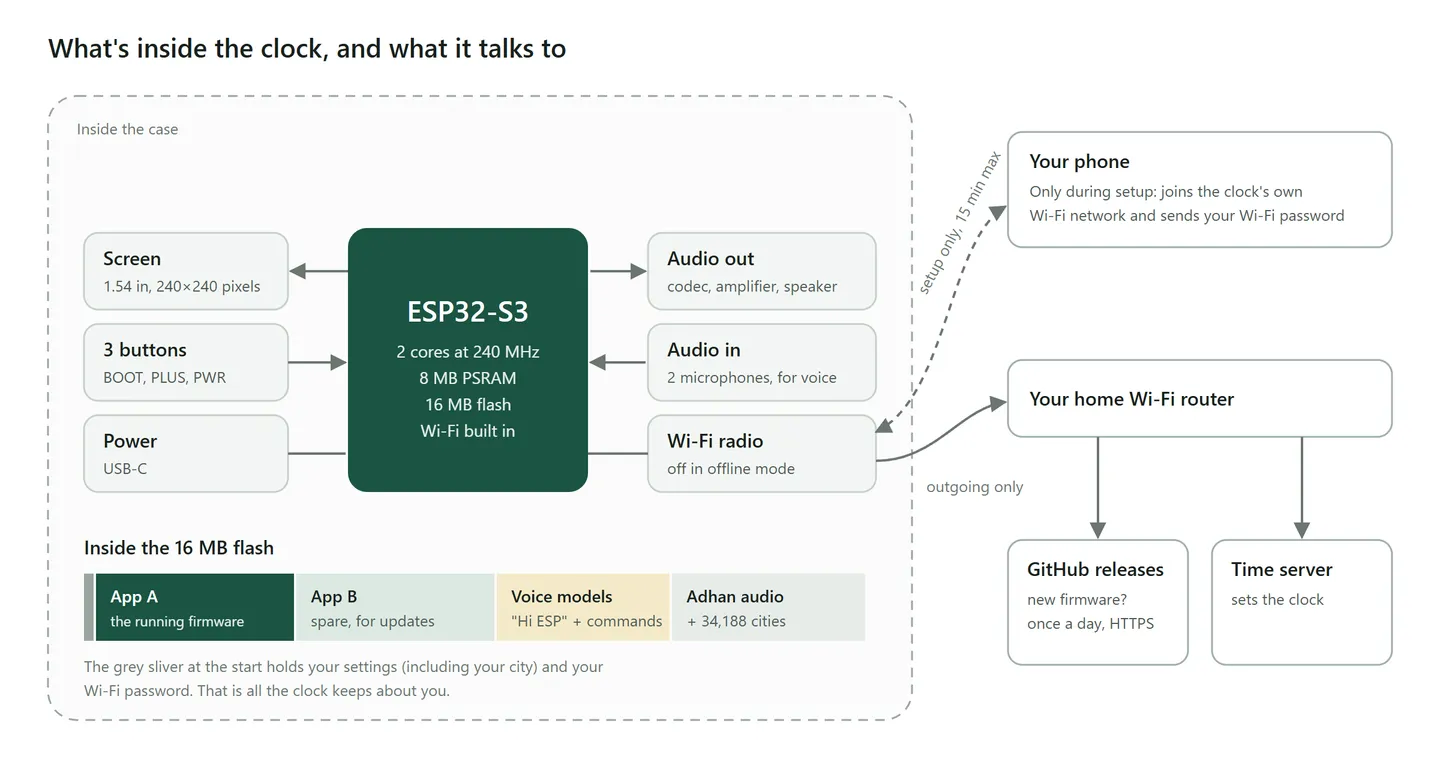
Everything the clock needs is inside it. The flash holds two copies of the firmware (one running, one spare for updates), the speech models, the adhan recordings and a list of 34,188 cities in 244 countries, each with its time zone. That list takes 915 KB, and it’s the reason setup works without the internet: you pick your city from the clock’s own list instead of a phone looking it up.
Each day the clock works out the five prayer times and sunrise for your city, using the method and Asr school you chose. It picks a sensible default method for your country, which you can change. The times drive everything else: the home screen, the countdown, the adhan and the night clock.
Wi-Fi is optional. With it, the clock sets its own time and checks for updates. Without it, you set the time by hand once, and the clock keeps it. If the power fails and there’s no Wi-Fi, it asks you for the time again when it comes back. An offline switch in the settings keeps the radio off completely.
Setup, with or without a phone
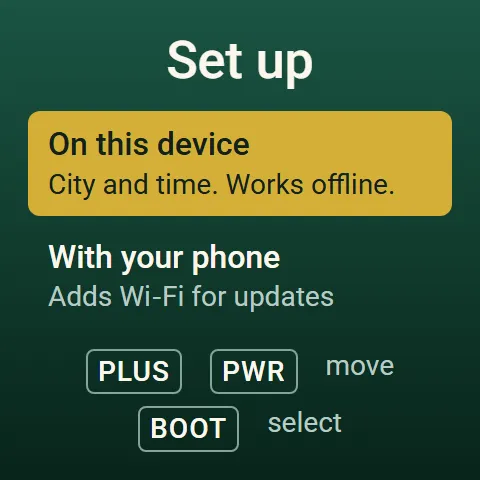
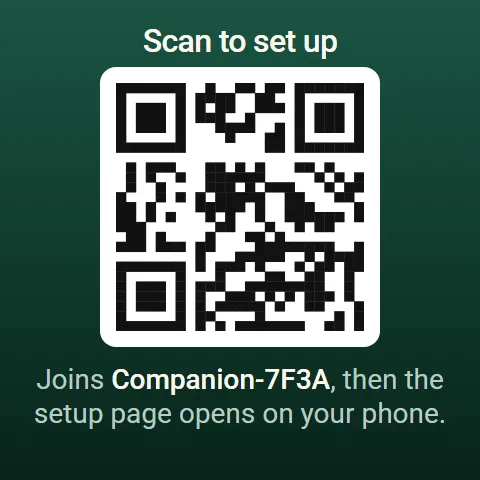
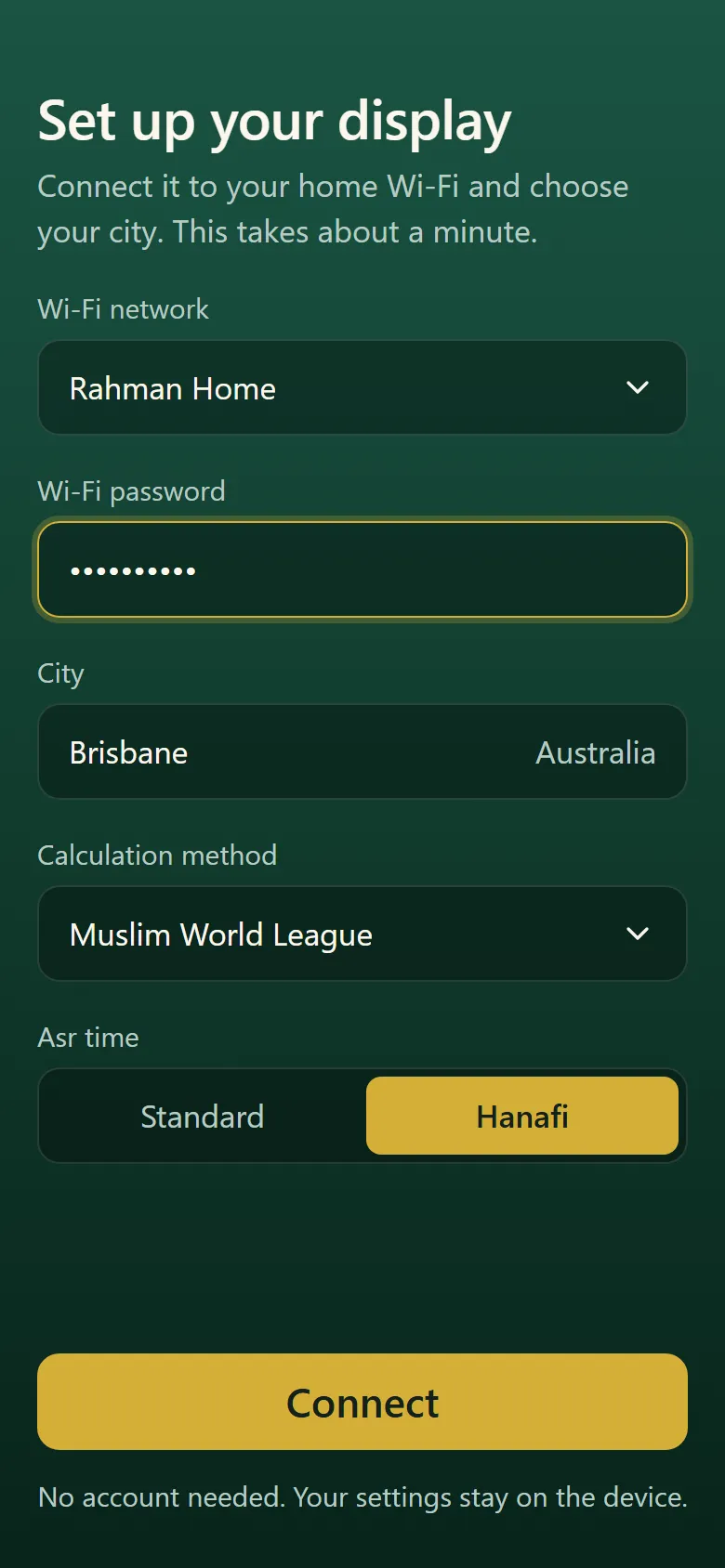
On first boot the clock asks how you want to set it up. On the device, you scroll to your country and city, set the time and you’re done. With a phone, the clock shows a QR code. Your phone joins the clock’s own little Wi-Fi network, which gets a new random password every time, and a one-page form opens. It asks for your home Wi-Fi password and, as a shortcut, your city, method and Asr. The setup network shuts itself down after it succeeds or after 15 minutes.
Updates that can’t brick it
Once a day, the clock asks my release page on GitHub whether there’s a newer version for this board. If there is, it waits for a quiet moment: never in the 10 minutes before a prayer, and never while the adhan is playing. Then it downloads the new firmware into the spare half of its flash and restarts into it. The new version has to pass its own checks on the way up. If the prayer maths, the settings, the screen or the speaker fail, the clock goes back to the old version, which is still sitting in the other half.
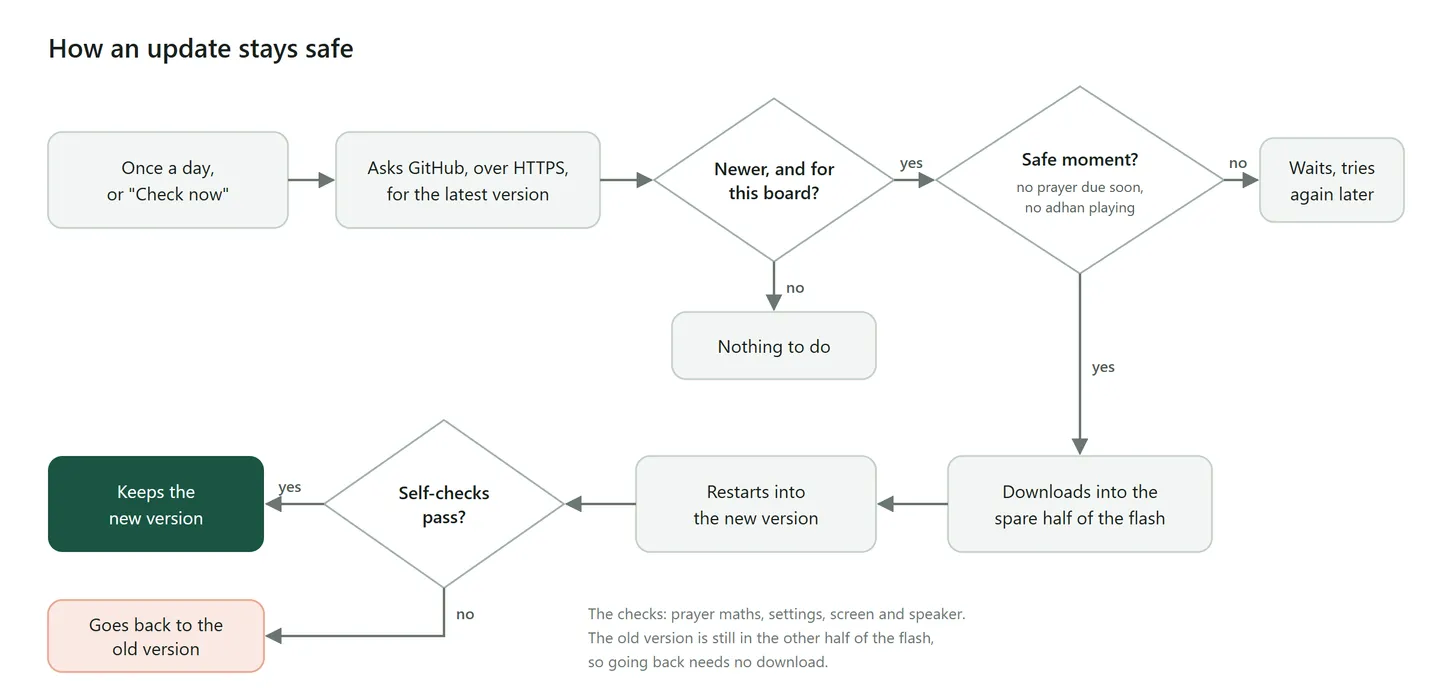
That last step hid a bug. The firmware runs the Arduino core on top of ESP-IDF, and Arduino’s startup code marks freshly installed firmware as good the moment it boots, before any of my checks run. That meant a broken update could never roll back. The fix is short: tell Arduino to leave the decision to me, and keep the new version only once the checks pass.
// Arduino would mark a new update good at startup, before our checks run.
// Returning true hands that decision to us.
extern "C" bool verifyRollbackLater(void) { return true; }

void setup() {
    prayer_selfcheck();   // a wrong result stops here, and the board rolls back
    settings_selfcheck();
    // ... display, buttons, speaker ...
    if (display_ok && audio_ok) ota_mark_good();  // only now keep this version
}
How I built it
I started with the part that had to be right. An earlier prototype on the same board did nothing but calculate prayer times, and I checked it against adhan-js. Its Hijri dates matched the ICU calendar for every day from 2020 to 2031. That code went into the real firmware almost untouched, and the clock re-checks it against known results every time it starts.
Next I designed every screen before writing any interface code: 17 screens at the real 240×240 size, plus the phone page. A 1.54-inch screen leaves no room for vague decisions, so I settled each one in the design. I fixed a small palette (deep green, warm white, and gold reserved for “next” and “now”) along with a handful of type sizes and spacings, and the firmware uses only those.
I also wrote down a short list of rules the code must never break, and a small script that checks for them. No open Wi-Fi. HTTPS always checks the server’s certificate. No passwords in the code, and nothing listening on the network once setup is over. Pin numbers live in one file only.
Then I built it in stages: getting the board up, the prayer core, menus and settings, the adhan, setup on the device, Wi-Fi through the phone, updates, reset and recovery, and finally voice. After each step I flashed the board, read its log and tried the parts that need eyes and ears. Last, I ran real updates through the whole system and did a full review of the code.
By the numbers
| Item | Detail |
|---|---|
| Cities built in | 34,188, in 244 countries |
| Calculation methods | 7 (Muslim World League, ISNA, Egypt, Karachi, Dubai, Kuwait, Turkey) |
| Firmware | About 5,600 lines of C and C++; 3.1 MB with voice |
| An update | About 30 seconds to download, then it installs itself |
| Bugs found in testing | 3 by the first real update test, 10 more in the code review |
| Monthly cost | $0 |
What I learned
Designing at the real pixel size paid off more than anything else. Every screen was settled before code, so building it was a matter of matching a picture, and the device looks like the design.
Test the update system for real, and early. My first real update test found three bugs. GitHub’s redirect header is about 1 KB, which overflowed a 512-byte buffer. The voice listener starved the processor while the flash was being written, so the watchdog rebooted the clock halfway through the download. And there was the Arduino rollback trap above. One night a broken test build kept my clock restarting in a loop from 1 am until 6:20 that morning.
Wi-Fi had a trap of its own. For a while the clock forgot a newly chosen network after a restart. The Wi-Fi driver skips saving a configuration that matches the one it already has, so my “save after joining” did nothing. Saving when the form is submitted fixed it.
Check which board you’re about to flash. I had two Waveshare boards plugged in, Windows showed both as the same “USB Serial Device”, and I flashed the wrong one. Now I read the board’s hardware ID before every flash.
Three buttons and no touch screen turned out to suit a clock. You mostly look at it, and every screen tells you what each button does.
What’s next
New features will arrive as updates. Before anyone else gets one of these, it needs two more protections: a digital signature check on every update, and encrypted storage. The adhan recordings in the prototype are placeholders for development, so licensed recordings are on the list too. There’s one known bug: the phone setup page sometimes closes on the first try, and works on the second. And I’m taking the same design to bigger screens, a 4.3-inch touch screen and a 2.16-inch AMOLED board.
Credits
City data from GeoNames (CC BY 4.0). Prayer times checked against adhan-js. Screens drawn with LVGL, set in Roboto, with icons from Lucide.
FAQ
Does it need the internet?
No. Prayer times, the adhan, the Hijri date, the clock and every setting work with Wi-Fi off. Wi-Fi only adds automatic time and updates, and the offline switch keeps the radio off for good.
How accurate are the prayer times?
They're calculated on the clock with standard methods and checked against adhan-js. You choose the method and Asr school, and can shift each prayer by up to 30 minutes to match your mosque. Umm al-Qura and a few other methods aren't supported yet, because my port can't compute them exactly.
Is it secure? What does it store?
It's designed so it can't become a way into your home network. Once setup is done, it runs no server of any kind. It only reaches out to two places: my release page on GitHub for updates, over HTTPS that checks the server is genuine, and a public time server for the clock. It stores its settings, including your city, and your Wi-Fi password on the device and nowhere else. There's no account and no tracking, and voice commands are recognised on the clock. A factory reset erases all of it. Signed updates and encrypted storage are still to come.
Can I buy one, or get the code?
Not yet. It's a prototype, and the code isn't public.
Related builds
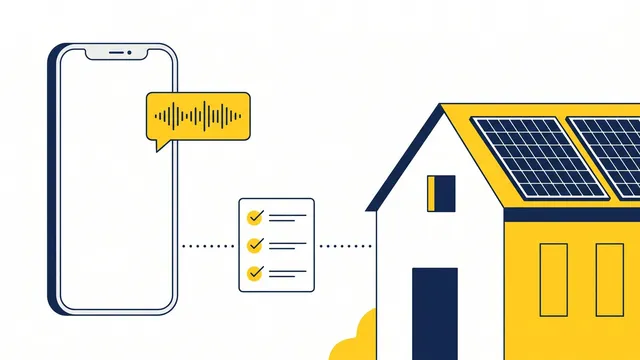
Voice AI
AI receptionist for a solar installer
Answers every call for a solar installer, qualifies the caller and routes the lead, day or night.
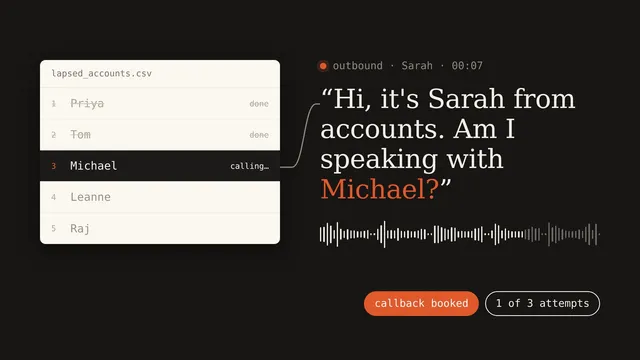
Voice AI
AI outbound calling agent for B2B win-back
Rings lapsed B2B customers, finds out why they stopped ordering and books a call with their account manager.
Get the next blueprint
A free monthly blueprint for small businesses adopting data, AI and automation.
You'll confirm on Substack. No spam, unsubscribe anytime.
Want one like this for your business? Book a free chat →