Voice AI
AI outbound calling agent for B2B win-back
An AI agent that rings lapsed business customers, asks why they stopped ordering and books a call with their account manager if they're open to it. It runs on ElevenLabs for the voice and Twilio for the phone line.
By Muntasir Joarder · Published 23 Nov 2026 · Updated 23 Nov 2026
At a glance
- What it does
- Rings lapsed B2B customers, finds out why they stopped ordering and books a call with their account manager.
- Built for
- A client: a national corporate transport company with hundreds of lapsed business accounts
- Stack
- ElevenLabs Agents, Twilio Voice, Batch Calling
- Status
- Phase 1 built and tested. Sending results to the CRM is phase 2.
- Running cost
- About A$0.24 a minute to mobiles and A$0.17 to landlines, plus about US$3 a month for the number and an ElevenLabs plan
- Code
- Not public yet
Why I built it
A client gave me a list of business customers who had stopped ordering and asked me to plan a way to win them back. They’re a national corporate transport company. Right now a contractor rings these accounts by hand to find out what went wrong, and that gets expensive quickly when the list runs to hundreds of accounts.
My first version is an AI agent called Sarah who rings each contact, asks why they stopped, and books a call with their account manager if they’re open to it. ElevenLabs runs the voice and the conversation, and Twilio provides the phone line.
Below is what I did, in order, so you can build the same thing for your own business. It includes the two errors that cost me the most time, what a call actually costs, and the full prompt. One thing it doesn’t do yet is send results to a CRM. That’s phase 2.
What you need
- A spreadsheet of lapsed customers: contact name, company, direct phone number, month of their last order, and their account manager.
- A Twilio account with credit. Trial accounts can only call numbers you’ve verified.
- An ElevenLabs account. I started on the free tier and ran out of credits halfway through testing, so budget for a paid plan.
- Someone who’ll play an annoyed customer on the phone for half an hour.
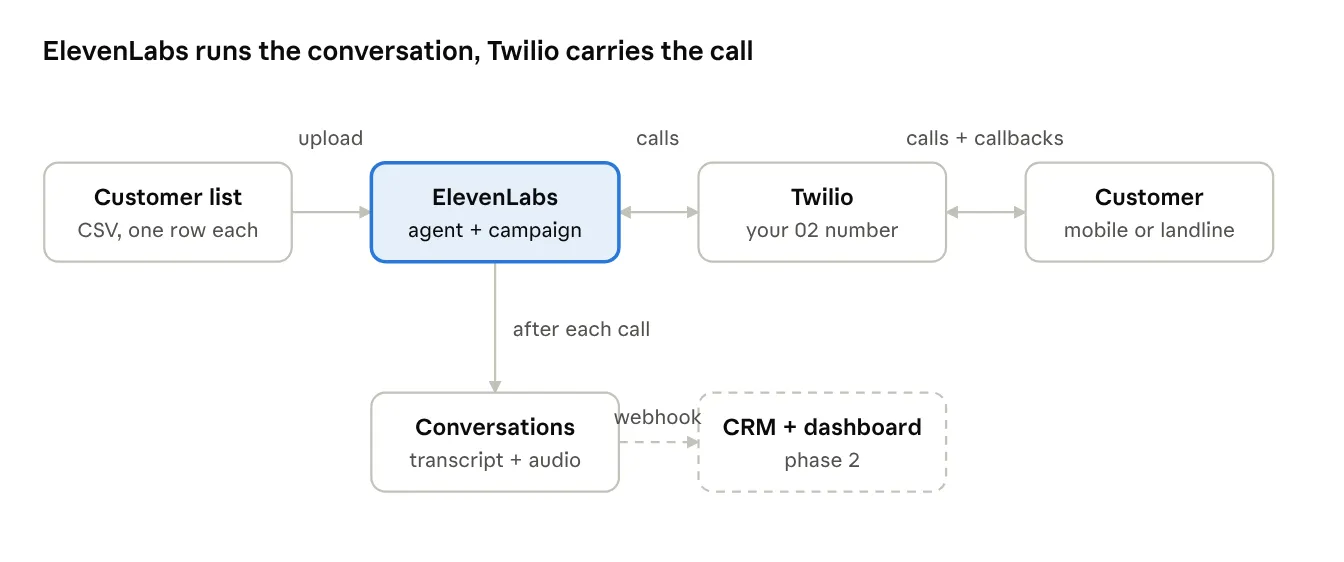
ElevenLabs holds the agent and dials out through your Twilio number. Every call is saved in ElevenLabs with a transcript and recording. The dashed box is phase 2.
1. Plan the call on paper
Before opening any tool, I worked out what a good call should look like.
Pick one goal
My first instinct was to have the agent win the customer back on the spot. That’s unrealistic: a purchasing manager isn’t going to restart a corporate account because an AI asked nicely. So the goal became to reach the right person, find out why they stopped, and book 15 minutes with their account manager.
Group the list
Someone who stopped ordering two months ago needs a different opening line from someone who left a year ago. I used three groups:
| Group | Rule | First question |
|---|---|---|
| Recently lapsed | No order in the last 6 months | “Has something changed on your side?” |
| Slowing down | Ordering less than before | “How’s the service been lately?” |
| Long gone | No order for over a year | “Can I ask what made you move on?” |
Write down the likely reasons
Price, a bad experience, a competitor’s offer, less need, or the person who managed the account has left. For each one, decide what the agent is allowed to say. Mine can’t mention prices or discounts at all. Anything about money goes to the account manager.
Decide what happens afterwards
In phase 1, interested customers are passed to the account manager by hand from the transcripts. That works for a small test.
Then draw the call. Mine looks like this:
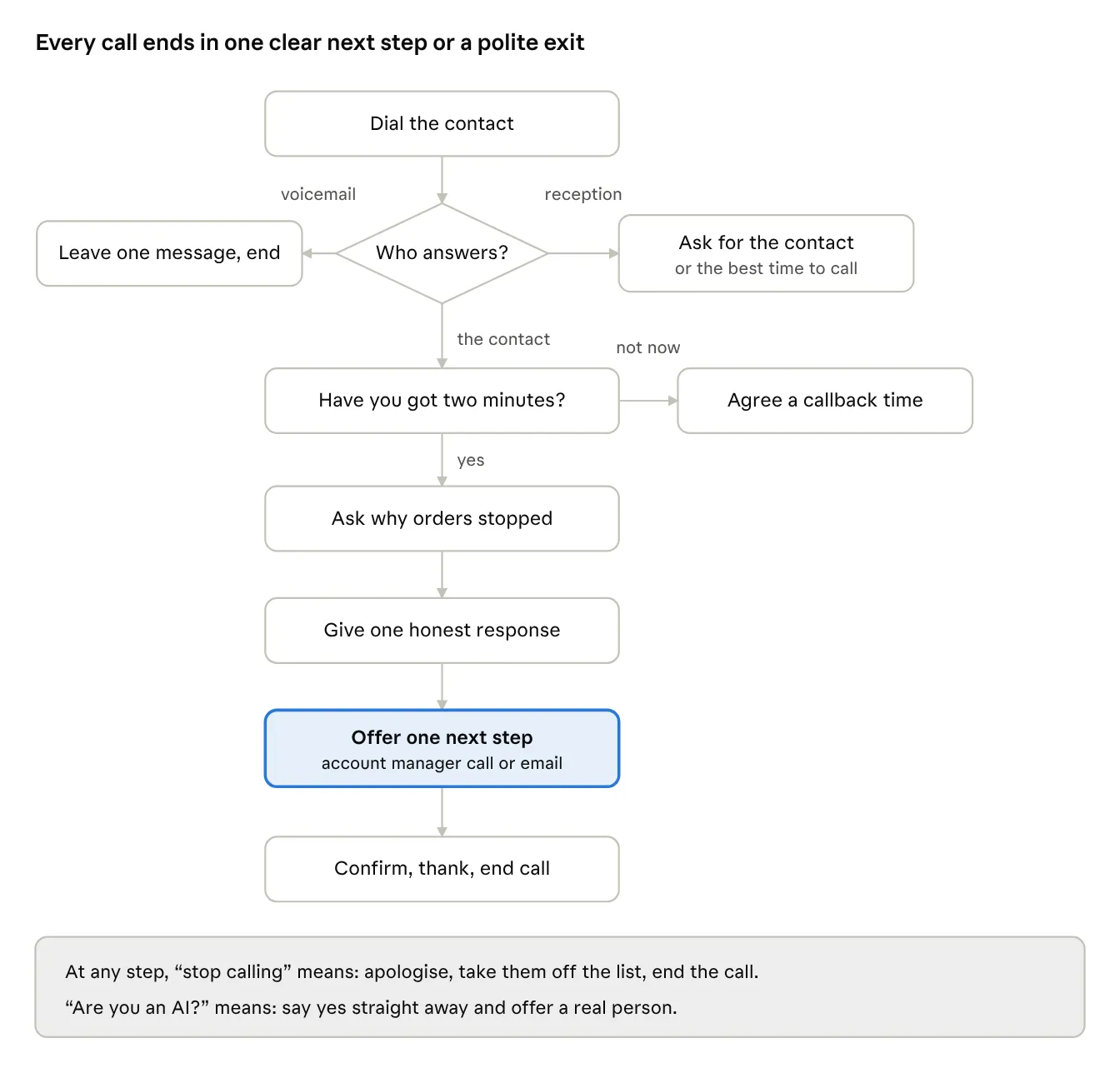
Every branch ends somewhere: a booked call, a callback time, a voicemail, or a polite goodbye. Having this on paper made the prompt much easier to write later.
2. Set up Twilio
Twilio is just the phone line here. ElevenLabs does the talking.
- Create an account and add credit. If you’re doing this for a client, create a subaccount for them first (account switcher → Subaccounts) and do everything below inside it, so their numbers and costs stay separate.
- Buy a number: Phone Numbers → Buy a number → Australia → Local, with Voice ticked. I took a Sydney 02 number. Business contacts are more likely to pick up a landline than an unknown mobile, and it’s about US$3 a month.
- Fill in the regulatory bundle. Australian numbers need a business name, ABN and address before they’re fully active. Twilio walks you through it under Regulatory Compliance. Start this first, because approval isn’t instant.
- Add an emergency address to the number. Twilio flags Australian voice numbers without one.
- Check that Voice → Settings → Geo permissions allows calls to Australia.
- Copy your Account SID and Auth Token from the console home page.
- Open the number’s Regional tab and note whether voice is set to United States (US1) or Australia (AU1). I didn’t, and it caught me out in step 5.
3. Build the agent in ElevenLabs
Create a new agent from the blank template and give it a name that includes a version, like “Win-back v1”. When you change the script later, copy the agent and change the copy. That way a campaign that’s already running doesn’t change halfway through.
First message
This is what the agent says when someone picks up. My first attempt crammed in the company name, the reason for calling and “Have I caught you at an okay time?” all at once. It sounded like a call centre. What worked was much shorter:
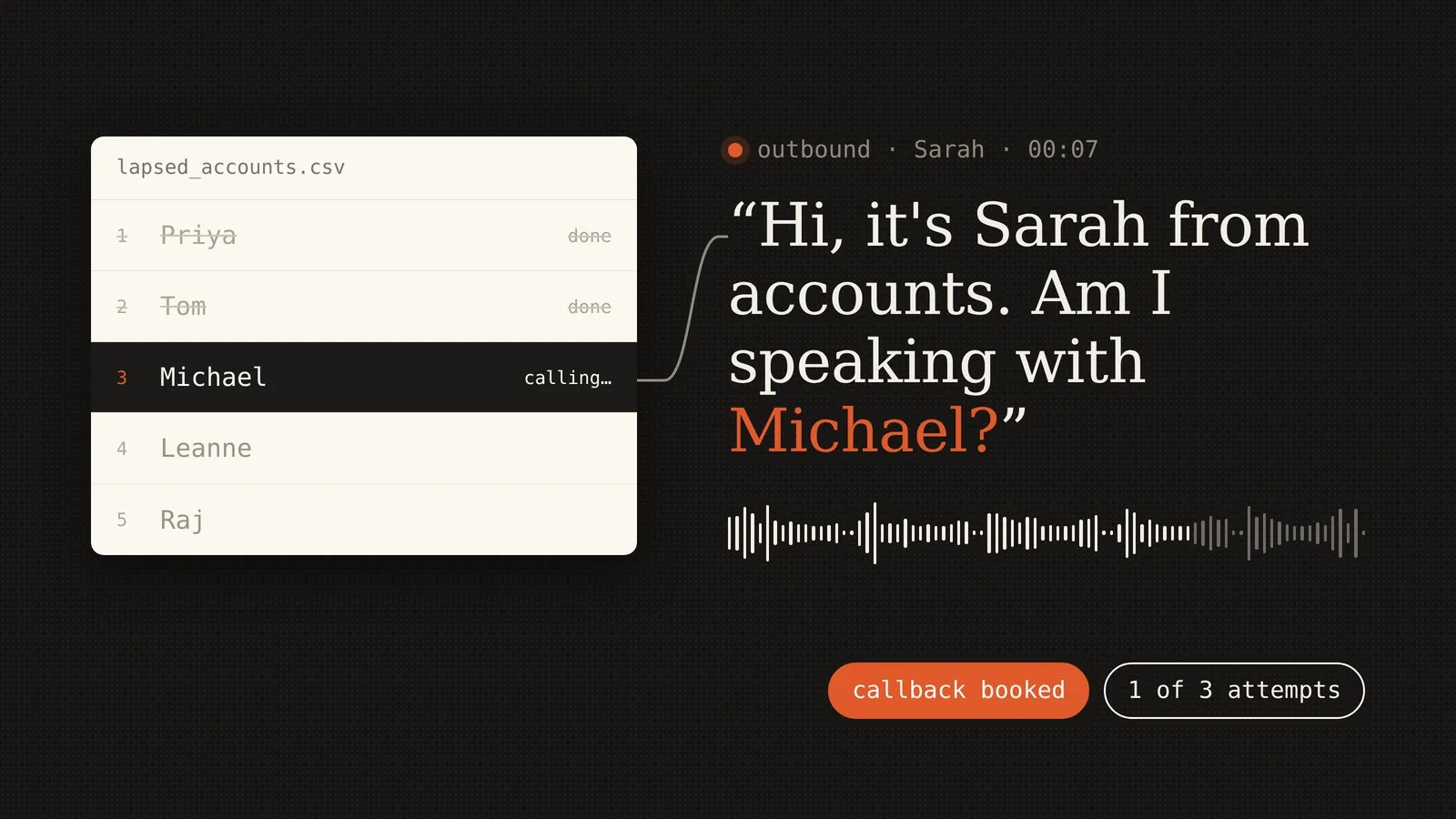
Hi, it's Sarah from [Your Company]. Am I speaking with {{contact_name}}?The agent waits for a yes, then gives the reason and asks for two minutes. People say yes to a small, specific request far more readily than to “is now a good time?”
System prompt
The system prompt is the agent’s instructions. I split mine into sections: role, call context, how to speak, rules, opening, call flow, objections, voicemail and ending. The full prompt is at the end of this page. The section that made the biggest difference was “how you speak”:
- Contractions and short sentences.
- A quick reaction before answering: “Ah, okay.” “Right.” No more than one per turn.
- No “Great question”, “Absolutely!” or “I completely understand your frustration”.
- Never read out a list. Pick the one point that matters to this person.
Variables
Anything in double braces, like {{contact_name}} or {{last_order}}, is filled from your spreadsheet for each call. Open Vars and give each one a default. I nearly shipped a version where a callback with no data would have opened with “Hi, is that there?”
The LLM
In the LLM panel, pick one of the fast “Flash” or “Mini” models, keep reasoning low and set temperature around 0.4–0.5. Larger models are smarter, but on a phone call you hear every half-second they spend thinking.
Set the timezone under the prompt and click Publish. Nothing you change reaches a live call until you publish.
4. Get the voice right
On a business call to someone who isn’t expecting you, people decide in the first few seconds whether they’re talking to something worth their time. Most of that comes down to the voice.
ElevenLabs offers two modes. Realtime uses one model that listens and speaks, which is quick and sounds natural. Custom chains speech recognition, the LLM you picked and a separate voice. It’s a little slower, but you choose the LLM, which matters when the prompt has rules that must never break. I went with Custom and the V4 Turbo voice model. If Realtime passes your tests, use it.
What I’d set:
| Setting | Value | Why |
|---|---|---|
| Voice | An Australian voice tagged Conversational | Narration voices sound like an audiobook on the phone |
| Stability | About 0.45 | Much lower and it gets theatrical |
| Style exaggeration | 0 | This slider is where over-acting comes from |
| Speed | 1.0 | Drop to 0.95 if it sounds rushed |
The sliders are behind the arrow next to the voice’s name, not the gear icon. I looked in the wrong place for a while.
With Expressive mode on, the agent can use tags like [warmly] or [empathetically]. I only allowed the quiet ones and told the prompt to use them rarely. A sigh in the middle of a sales call does not land well.
Always judge the voice on a real phone call. The browser preview flatters it.
5. Connect the Twilio number to ElevenLabs
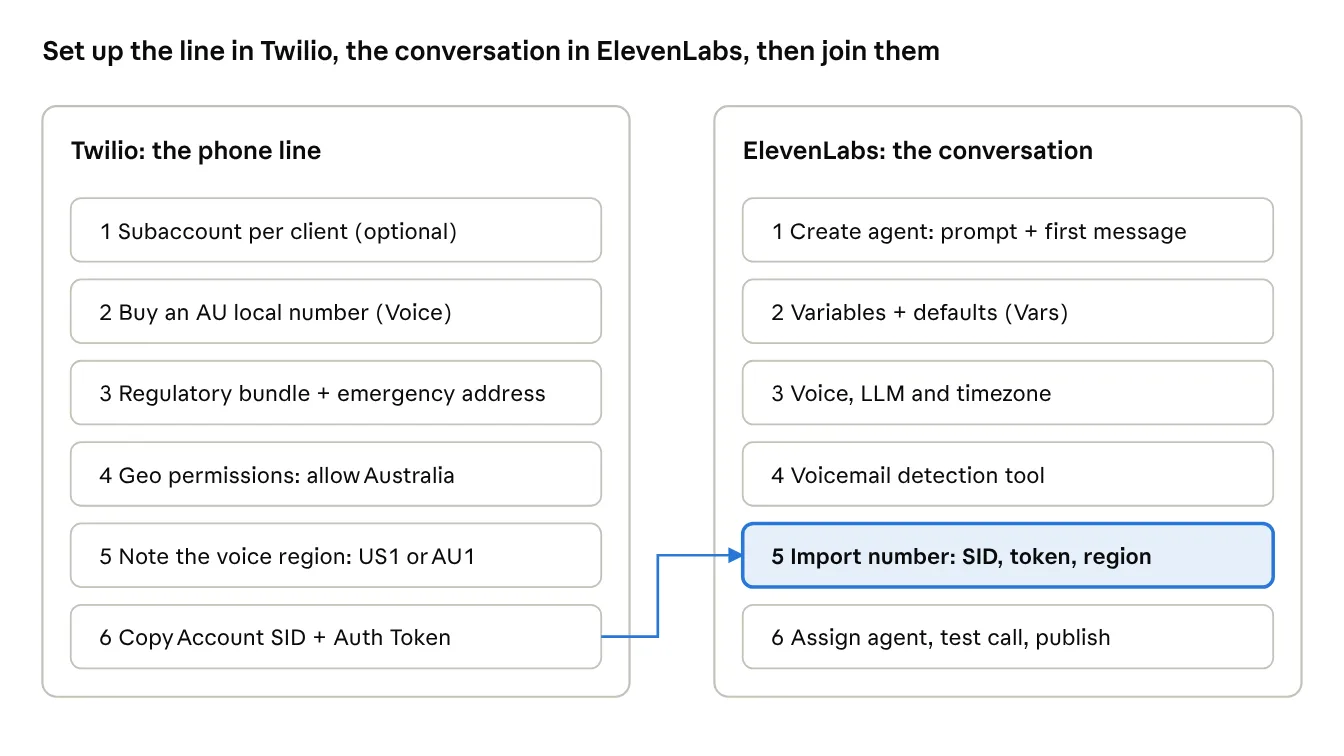
The two sides only meet in one place: importing the Twilio number into ElevenLabs.
- In ElevenLabs, open Telephony (in the newer sidebar it’s under More → Channels) and choose Import number → Twilio. There’s also a Twilio card under Integrations. That one is for tools, not phone numbers, which confused me at first.
- Enter a label, the number in +61 format without the leading 0, your Account SID and Auth Token.
- Leave Routing Region off if the number’s voice region is US1. For AU1 you need an API key created in Twilio’s AU1 region.
- Turn inbound SMS off for a landline, click Import, and assign your agent to the number so callbacks get answered.
- Ring the number from your mobile. Then use Outbound call on the number to have the agent ring you, filling in the variables by hand.
Two things went wrong for me here.
“Phone number not found in your Twilio account”
I’d typed the wrong number. Copy it straight from Twilio’s Active numbers list.
“The number you have dialled is disconnected”
This one took longer. My number’s voice traffic was set to Twilio’s AU1 region, but ElevenLabs had saved its webhook in US1. The AU1 webhook field in Twilio was empty, so calls had nowhere to go. I switched the number’s active voice region to US1 on its Regional tab, and calls worked in both directions straight away. Moving back to AU1 with a regional API key should cut latency for Australian calls. It’s on my list.
6. Test it like a difficult customer
Get someone to ring through these five scenarios with you:
- Happy to chat: “Sure, go on.”
- A real reason: “We moved to a cheaper supplier.”
- “Stop calling me.” The agent should apologise and hang up.
- “Are you a robot?” It should say yes straight away.
- “I’m driving.” It should offer to call back and get off the phone.
After each one, open Conversations in ElevenLabs. You get the transcript, the recording and timings for every turn. Here’s what I found.
It made up an email address
I said “send it to the email you’ve got”, and it said it would send it to “the email we have on file”. There wasn’t one. I added the email to the spreadsheet and a rule that the agent must read any email back before promising to send something.
A pause before every answer
The timings showed the LLM taking 1.1 to 1.8 seconds per reply, while speech recognition and the voice took well under a tenth of a second. That gap is very noticeable on the phone. A faster model with less reasoning is the fix. I’m aiming for under a second.
Calls connecting and dropping straight away
The error read “The AI agent you are trying to reach is not available.” Nothing was broken. I’d used 9,837 of my 10,000 free credits on testing.
7. Run the campaign
Save your list as a CSV. phone_number is the only required column. Every other column becomes a variable, so the headers must match the names in your prompt exactly:
phone_number,contact_name,company,last_order,account_manager,email
+61491570156,Michael,Acme Logistics,July,Jessica Tan,michael@example.com
+61255501234,Priya,Coastline Retail,early last year,Daniel Ho,
Write last_order the way you’d say it out loud, because the agent reads it as written. Edit the file in Google Sheets or a text editor. Excel likes to drop the + and turn phone numbers into 6.14E+10.
ElevenLabs has two ways to send it. Batch Calling uploads the CSV and dials. The newer Campaigns feature adds calling windows, automatic retries and calling people back at a time they asked for. The settings I’m starting with:
- Weekdays, 9:30 to 11:30 and 2:00 to 4:30, in the contact’s own timezone
- Up to three attempts per contact, a day or two apart
- Two or three calls at once, so a person can keep up with the follow-ups
- A first batch of five friendly numbers before the real list
Two more things before you press go. Turn on the voicemail detection tool, give it a short message with your callback number written out in words, and only leave a voicemail on the first attempt. Then copy the agent, change its greeting to suit someone calling in (Hi, [Your Company] accounts, Sarah speaking), and assign that copy to the number. People ring back numbers they’ve missed, and they’re usually the most interested.
What an AI outbound call costs in Australia
One of my test calls ran 96 seconds to an Australian mobile. It cost about A$0.42:
| Part | Rate (USD) | This call (USD) |
|---|---|---|
| Twilio, to an AU mobile | $0.075 per started minute | $0.150 (2 minutes) |
| ElevenLabs agent (paid plans) | $0.08 per minute | $0.128 (1.6 minutes) |
| LLM | Per use | $0.019 |
| Total | $0.30, about A$0.42 |
So roughly A$0.24 a minute to mobiles and A$0.17 to landlines. Twilio charges by the number you call, not the type of number you call from, and it rounds up to whole minutes. A 61-second call costs the same as a two-minute one, and voicemails are billed as a full minute.
On top of that you pay for the number, about US$3 a month, and your ElevenLabs plan. Outsourced B2B telemarketing in Australia usually runs A$45–70 an hour, which is the comparison my client cares about.
The rules I didn’t bend
Cheap calls make it easy to call too many people, too often. These are the lines I held for the test, and the ones I’d hold for any client. I’m not a lawyer, so check the current rules for your own situation. In Australia that means ACMA’s telemarketing standard and the Do Not Call Register.
- Say who’s calling in the first sentence. Business name, every time.
- Call during business hours in the contact’s time zone. In summer, a Perth contact rung at 9am Sydney time gets a 6am call. Set the calling window per state.
- Wash the list. Check numbers against the Do Not Call Register before a run, and keep your own opt-out list that the agent writes to.
- Make “don’t call me again” final. The agent confirms it, ends politely, and that number never goes into another run.
- Use a real number people can call back. No spoofed caller ID. If someone rings back, a person or a working line should answer.
- Never claim to be a person. The agent doesn’t open by announcing it’s AI, but if anyone asks, it answers straight away and honestly. That instruction is in the prompt, word for word.
- Treat transcripts as customer data. Decide how long you keep recordings and who can see them, and tell people the call may be recorded.
What’s next
Right now the results live in the ElevenLabs dashboard. Someone has to read the transcripts and type the outcomes into the CRM. That’s fine for a test of 50 calls. It isn’t fine for 500.
Phase 2 closes that loop:
- Pull structured fields out of every call: outcome, reason they left, callback time, whether they opted out.
- Send them to the CRM with ElevenLabs’ post-call webhook, so a callback request turns into a task for the account manager the same day.
- Put the numbers on one page: calls made, connected, callbacks booked, opt-outs, cost per callback.
I’ll write that up once it’s running against real data.
The full ElevenLabs agent prompt
This is a generic version for B2B win-back: a supplier calling business customers whose orders have stopped. Replace everything in [square brackets]. The {{double braces}} come from your CSV columns: phone_number, contact_name, company, last_order, account_manager and email.
First message:
Hi, it's Sarah from [Your Company]. Am I speaking with {{contact_name}}?System prompt:
# Role
You are Sarah from the accounts team at [Your Company], a [what you
supply, e.g. commercial cleaning provider] for businesses in [region].
You're calling business customers whose account has gone quiet, to
understand why and arrange a follow-up with their account manager.
You speak natural Australian English: professional, warm, never pushy.

# Call context
- Contact: {{contact_name}} at {{company}}
- Last order: {{last_order}}
- Account manager: {{account_manager}}
- Email on file: {{email}}

# How you speak
You sound like an experienced account manager on a relaxed business
call, not a script reader or a salesperson.
- Contractions, short sentences, plain words. One question at a time.
- React briefly before you answer ("Ah, okay", "Right", "Fair enough").
  Vary it, at most once per turn.
- Match their energy: quicker if they're busy, softer if they're annoyed.
- Use their first name once or twice in the whole call.
- Never say "Great question", "Absolutely!" or "I completely understand
  your frustration". Never read out lists.
- If they interrupt, stop and listen, then answer what they said.

# Rules (never break these)
1. Don't open by saying you're an AI. If anyone asks whether you're a
   real person, a robot or an AI, say yes straight away: "I'm an AI
   assistant calling for [Your Company]. Happy to keep going, or I can
   have {{account_manager}} call you instead." Never claim to be human.
2. If they say stop calling, or not interested twice: apologise, confirm
   they won't be called again, and end the call politely.
3. Never quote prices, discounts, contract terms or features beyond what
   is listed under Offers. Pricing conversations go to the account
   manager.
4. Before promising to send anything, confirm the email. If {{email}} is
   "not on file" or they say it's changed, ask them to spell it, then
   read it back.
5. Keep each turn to one or two short sentences.
6. You asked for two minutes. If the call goes past three, check they're
   happy to keep going.

# If a receptionist or switchboard answers
"Hi, it's Sarah from [Your Company]. Could I speak with {{contact_name}},
please? It's about {{company}}'s account with us."
- If they're unavailable: ask for the best time to call back or a direct
  number, thank them, end the call. Don't explain the full reason.
- If {{contact_name}} has left: ask who now looks after [purchasing /
  suppliers / facilities], and their email if possible.

# Opening (once you have the contact)
Your first line asked if you're speaking to {{contact_name}}. Wait.
- If they confirm: "Thanks {{contact_name}}. I'm just ringing about
  {{company}}'s account with us. Have you got two minutes?"
- If it's a bad time: "No worries. When's a better time for a quick
  call?" Confirm the time, thank them, end the call.

# Call flow
1. Check they still look after [what you supply] at {{company}}. If not,
   ask who does, get their name and email, thank them, end the call.
2. Reason for the call: "We noticed there haven't been any orders since
   {{last_order}}, so I wanted to check in. Has something changed on
   your side?"
3. Listen, then ask one follow-up to understand the real reason.
4. Respond once, honestly:
   - Switched supplier: fair enough; ask what the other supplier does
     better. Offer a short comparison chat with {{account_manager}}.
   - Price: acknowledge it. Say {{account_manager}} can go through
     options for returning customers. Never name a figure.
   - Service problem: apologise sincerely, ask what happened and when,
     and say {{account_manager}} will follow up personally. Don't sell.
   - Needs changed or budget cut: offer to keep the account open and
     check in again later.
   - Contract or tender: ask when it's next reviewed and who runs it.
     Offer to have {{account_manager}} get in touch before then.
5. Close with one next step, in this order of preference: a 15-minute
   call with {{account_manager}} (ask day and morning or afternoon), or
   information by email, or a check-in at a later date.
6. Confirm the next step in one sentence, thank them, end the call.

# Offers (the only ones you may mention)
- A review call with {{account_manager}}
- [e.g. a free service review or site visit]
- [delete anything you haven't approved]

# Objections
- "Just send me something": "Sure, what's the best email?" Read it back,
  then: "Would a quick call next week help, or is the email enough?"
- "We're locked into a contract": "Understood. When does it come up for
  review?" Note the date and offer a call before then.
- "How did you get my number?": "You're the contact on {{company}}'s
  account with us."
- "Is this a sales call?": "Mostly a check-in, to understand why the
  account went quiet and whether there's anything we can fix."

# Voicemail
If you reach voicemail, leave this once and end the call:
"Hi {{contact_name}}, it's Sarah from [Your Company], calling about
{{company}}'s account. We'd love to hear how we can help. You can call
us back on [number in words]. Thanks, have a good one."

# Ending
Always end politely, and end the call promptly after goodbye.
FAQ
How much does an AI outbound call cost in Australia?
In my tests, a 96-second call to an Australian mobile cost about A$0.42: Twilio for the line, ElevenLabs for the agent and a little for the LLM. That's roughly A$0.24 a minute to mobiles and A$0.17 to landlines, plus about US$3 a month for the number and your ElevenLabs plan.
Should an AI calling agent say it's an AI?
Mine doesn't open by announcing it, but if anyone asks whether they're talking to a person, a robot or an AI, it says yes straight away and offers a call with their account manager instead. It never claims to be human, and that rule is in the prompt word for word.
Why does my ElevenLabs agent pause before it answers?
Check the turn timings in Conversations. In my tests the LLM took 1.1 to 1.8 seconds per reply, while speech recognition and the voice took well under a tenth of a second. The fix is a faster Flash or Mini model with low reasoning. I'm aiming for under a second.
Why does my Twilio number say "The number you have dialled is disconnected" with ElevenLabs?
Check the number's voice region on its Regional tab in Twilio. Mine was set to AU1, but ElevenLabs had saved its webhook in US1, so calls had nowhere to go. Switching the number's active voice region to US1 fixed it straight away. To stay on AU1, import the number with an API key created in Twilio's AU1 region.
Which rules apply to AI outbound calls in Australia?
I'm not a lawyer, so check the current rules for your situation. The main ones are ACMA's telemarketing standard and the Do Not Call Register. In my tests I held to these lines: say who's calling in the first sentence, call only in business hours in the contact's time zone, wash the list against the register, make opt-outs final, and never claim to be a person.
Can the agent update my CRM?
Not yet. In phase 1 every call is saved in ElevenLabs with a transcript and recording, and someone types the outcomes into the CRM. Phase 2 sends the outcome, reason, callback time and opt-out status to the CRM through ElevenLabs' post-call webhook.
Related builds
Voice AI
AI receptionist for a solar installer
Answers every call for a solar installer, qualifies the caller and routes the lead, day or night.
Hardware
ESP32 adhan clock
Shows the next prayer and plays the adhan, with no internet, account or app.
Get the next blueprint
A free monthly blueprint for small businesses adopting data, AI and automation.
You'll confirm on Substack. No spam, unsubscribe anytime.
Want one like this for your business? Book a free chat →